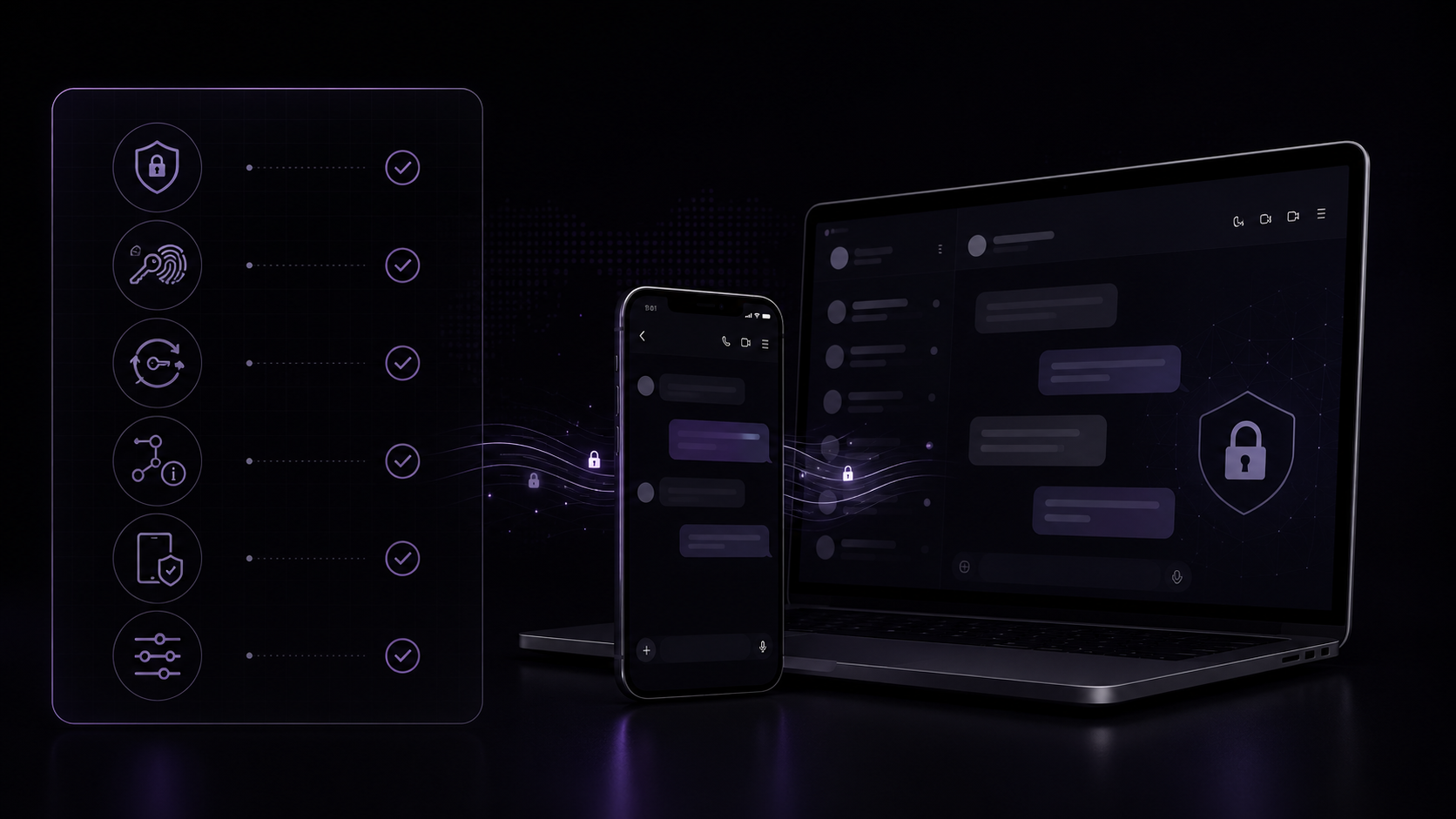
The safest messenger is not the one with the biggest lock icon. It is the one that clearly explains what is protected, what is stored, and where the limits begin.
A messaging app can display a lock, call itself private, and still leave important questions unanswered.
Which conversations are encrypted? Are attachments protected? Where are the keys stored? What information does the server retain? What happens when you lose a device? Can encryption keys change without warning?
These details determine whether a secure messaging app provides meaningful protection or merely uses security language in its marketing.
This guide gives you 12 practical questions to ask before trusting an encrypted messaging app with personal conversations, confidential files, or sensitive work.
What is a secure messaging app?
A secure messaging app is a communication service designed to protect conversations against unauthorized access, interception, account compromise, and unintended data exposure.
At minimum, a serious private messaging app should use secure network transport, strong account authentication, careful access controls, and clear data-handling practices.
For highly private conversations, it should also provide end-to-end encryption.
End-to-end encryption, or E2EE, protects supported content by encrypting it on the sender’s device and decrypting it on an authorized recipient’s device. The service can deliver the encrypted data without needing the readable message body.
However, encryption is only one part of messaging security.
A complete evaluation must also consider:
- Which conversations are encrypted
- Whether photos and files receive the same protection
- Where private keys are stored
- How contacts can verify keys
- What metadata remains visible
- How account and key recovery work
- What happens when a device is compromised
- How the service documents its limitations
For a deeper introduction, read End-to-End Encryption Explained.
Why the word “encrypted” is not enough
Almost every modern messaging service encrypts network traffic with HTTPS, TLS, or another protected transport.
That protection matters, but it does not necessarily mean the conversation is end-to-end encrypted.
With transport encryption, data is protected while moving between your device and the service. The service may still receive the readable content before delivering it through another protected connection.
With E2EE, supported message content is encrypted for the participants before it reaches the messaging service.
That distinction affects who may technically access the message body.
It is also why you should ask precise questions rather than accepting a general “encrypted” label.
| Claim | The question you should ask |
|---|---|
| “Your chats are encrypted” | Are they encrypted only in transit or end to end? |
| “Your data is secure” | Which data, against which threats, and for how long? |
| “We cannot read your messages” | Does this cover direct chats, groups, media, calls, and backups? |
| “Private by design” | What metadata and operational information remain available? |
| “Secure recovery” | Who can restore the encryption keys, and what secret is required? |
1. Which conversations are end-to-end encrypted?
Do not assume that one encryption statement applies to every part of an application.
A messaging service may provide different protections for:
- Direct one-to-one conversations
- Private groups
- Public groups
- Broadcast channels
- Voice and video calls
- Stories or temporary posts
- Bots and automated accounts
- Synced conversation history
Ask the provider to identify the exact boundary.
A strong answer sounds like this:
Direct message bodies and media are encrypted on participant devices. Group conversations currently use a separate server-readable architecture and are not described as E2EE.
A weak answer sounds like this:
Your communication is protected with military-grade encryption.
The first answer gives you information you can evaluate. The second uses impressive language without defining the protected content or threat model.
2. Are photos, videos, and attachments encrypted too?
An application might encrypt text while handling uploaded media through a different system.
This creates an important question: does a photo receive client-side encryption before upload, or is it protected only by server permissions and transport encryption?
Ask about:
- Photos and videos
- Documents
- Voice messages
- Link previews
- Thumbnails
- Temporary upload files
- Cached media
- Download authorization
Media protection should be described separately rather than hidden inside a broad statement about “messages.”
A secure service should also enforce authorization when someone requests an uploaded object. Knowing or guessing a file URL should not be enough to access another person’s media.
3. Where are encryption keys generated and stored?
Encryption is only as trustworthy as its key handling.
For client-side E2EE, private-key material should remain under the control of participant devices. Public keys can be shared so that contacts can establish encrypted communication, but private keys require stronger protection.
Look for clear answers to these questions:
- Is the private key generated on the device?
- Is it ever uploaded without encryption?
- Can the provider derive or replace it?
- Can another signed-in device obtain it automatically?
- Is local key storage protected?
- What happens after a key reset?
- Does reinstalling the application create a new identity key?
The documentation does not need to expose every implementation detail. It should, however, explain the ownership and lifecycle of private keys.
4. Can contacts verify one another’s keys?
End-to-end encryption protects a conversation only when the encryption keys belong to the intended participants.
Many secure messaging systems represent a public key through a fingerprint, safety number, QR code, or another verification value.
Two contacts can compare that value through a trusted channel, such as:
- An in-person meeting
- A verified voice call
- A previously authenticated account
- A trusted company directory
Key verification provides additional confidence that a contact’s expected key is being used.
Also ask what happens when a fingerprint changes.
A changed key may have an innocent explanation, such as a reset, device replacement, or recovery operation. But the change should be visible. Silent replacement makes it harder to detect an unexpected identity-key change.
5. What metadata does the service retain?
Message content and message metadata are different categories.
A service may be unable to read an E2EE message body while still processing information needed to route, synchronize, and display the conversation.
Depending on the system, this may include:
- Sender and recipient account identifiers
- Conversation membership
- Message timestamps
- Delivery and read receipts
- Message size
- Reaction and edit events
- Device sessions
- Synchronization cursors
- Public-key material
- Push-notification tokens
- Abuse-prevention and security records
The existence of operational metadata does not automatically make a service unsafe.
The important questions are:
- What is collected?
- Why is it needed?
- How long is it retained?
- Who can access it?
- Can the user export or delete it?
- Is it used for advertising or unrelated profiling?
Be cautious when a provider claims to store “no metadata” without defining what it considers metadata.
6. How is your account authenticated?
Strong message encryption does not compensate for weak account security.
An attacker who takes over an account may be able to impersonate the user, register a new key, access server-readable content, or interfere with recovery.
Evaluate whether the service provides protections such as:
- Secure password handling
- Rate limiting
- Session revocation
- Clear device or session management
- Protection against credential replay
- Safe password-reset procedures
- Multi-factor authentication where appropriate
- Notifications for important account changes
Also distinguish account authentication from message encryption.
Signing in proves that someone has the account credential. It does not necessarily prove that the device possesses the original private encryption key.
7. How does encrypted recovery work?
Recovery creates one of the hardest trade-offs in private messaging.
Users understandably want access to conversation history after replacing a device. But if a provider can silently restore every private key, the provider may possess more decryption capability than users expect.
A protected recovery design may encrypt the private-key backup on the client and require a separate recovery phrase or recovery secret.
Ask:
- Is the backup encrypted before upload?
- Is the account password enough to restore it?
- Does the provider know the recovery secret?
- Can support staff reset the secret?
- What happens if the secret is lost?
- Does restoration preserve the same public-key fingerprint?
- Can recovery be disabled?
A trustworthy answer may include an uncomfortable limitation: losing both the private key and the recovery secret can make old encrypted content unrecoverable.
That consequence can be evidence of a real security boundary rather than a product defect.
8. What happens when your connection drops?
Security and reliability must work together.
Mobile connections disappear. Browsers sleep. Devices switch networks. A well-designed messenger should handle temporary disconnection without duplicating messages, losing ordering, or weakening encryption.
Look for an offline and synchronization model that can:
- Stage an outgoing action locally.
- Assign it a stable identifier.
- Retry safely after reconnection.
- Avoid duplicate sends.
- Reconcile the server acknowledgement.
- Retrieve changes missed while offline.
Encryption should remain in place while a message waits in an outbox or synchronization queue.
A service should not need to temporarily store a readable message merely because the network connection failed.
9. How are uploads and stored objects authorized?
Media security includes more than encryption.
A service may handle avatars, message attachments, wallpapers, stories, temporary uploads, and generated thumbnails. Each object requires an access policy.
Check whether the application:
- Requires authentication to retrieve private media
- Verifies that the requesting account belongs to the relevant conversation
- Separates public assets from private message objects
- Cleans up unattached uploads
- Removes expired temporary objects
- Prevents cross-account caching
- Uses unpredictable identifiers without treating unpredictability as authorization
A private file URL should not behave like a permanent public link unless the user deliberately created one.
10. Are group chats protected differently?
Group encryption is more complicated than direct-chat encryption.
Membership changes, multiple devices, message history, administrator roles, invitations, removals, and key rotation all create additional design requirements.
Some services provide E2EE for both direct and group chats. Others provide E2EE only for direct conversations and protect groups through TLS, authenticated storage, and server-side access controls.
The second model can still provide meaningful security, but it is a different trust boundary.
Ask whether the server can process group content and whether the protection changes when:
- A member joins
- A member leaves
- An administrator removes someone
- A message is edited
- History is synchronized to a new device
- A bot or integration enters the group
Never assume that a lock displayed in one conversation type automatically applies to every other type.
11. What privacy controls does the user have?
Privacy is also about control after information reaches the service.
Look for practical account and conversation controls such as:
- Exporting account data
- Deleting an account
- Revoking sessions
- Clearing local or synchronized history
- Deleting sent messages where permitted
- Managing read receipts
- Controlling profile visibility
- Blocking unwanted contacts
- Managing notification previews
- Disabling or deleting key backups
The provider should explain whether deletion removes only your copy, every participant’s copy, or the server record itself.
A recipient may already have downloaded, copied, forwarded, or photographed a message. No deletion feature can guarantee erasure from every endpoint.
12. Are the security claims specific and verifiable?
The strongest security documentation defines boundaries.
Look for specific statements about:
- Algorithms and key sizes
- Client-side versus server-side operations
- Conversation types covered by E2EE
- Media encryption
- Stored information
- Authentication
- Recovery
- Key changes
- Access controls
- Known limitations
- The date documentation was last updated
Treat vague phrases carefully:
- Unbreakable encryption
- Absolute privacy
- Military-grade security
- Completely anonymous
- Zero metadata
- Impossible to hack
- Future-proof encryption
No complex communication system should be evaluated through a slogan alone.
Independent audits, public technical documentation, reproducible clients, professional reviews, and clearly scoped security reports can provide additional assurance. They do not all offer the same level of evidence, but they are more useful than unsupported superlatives.
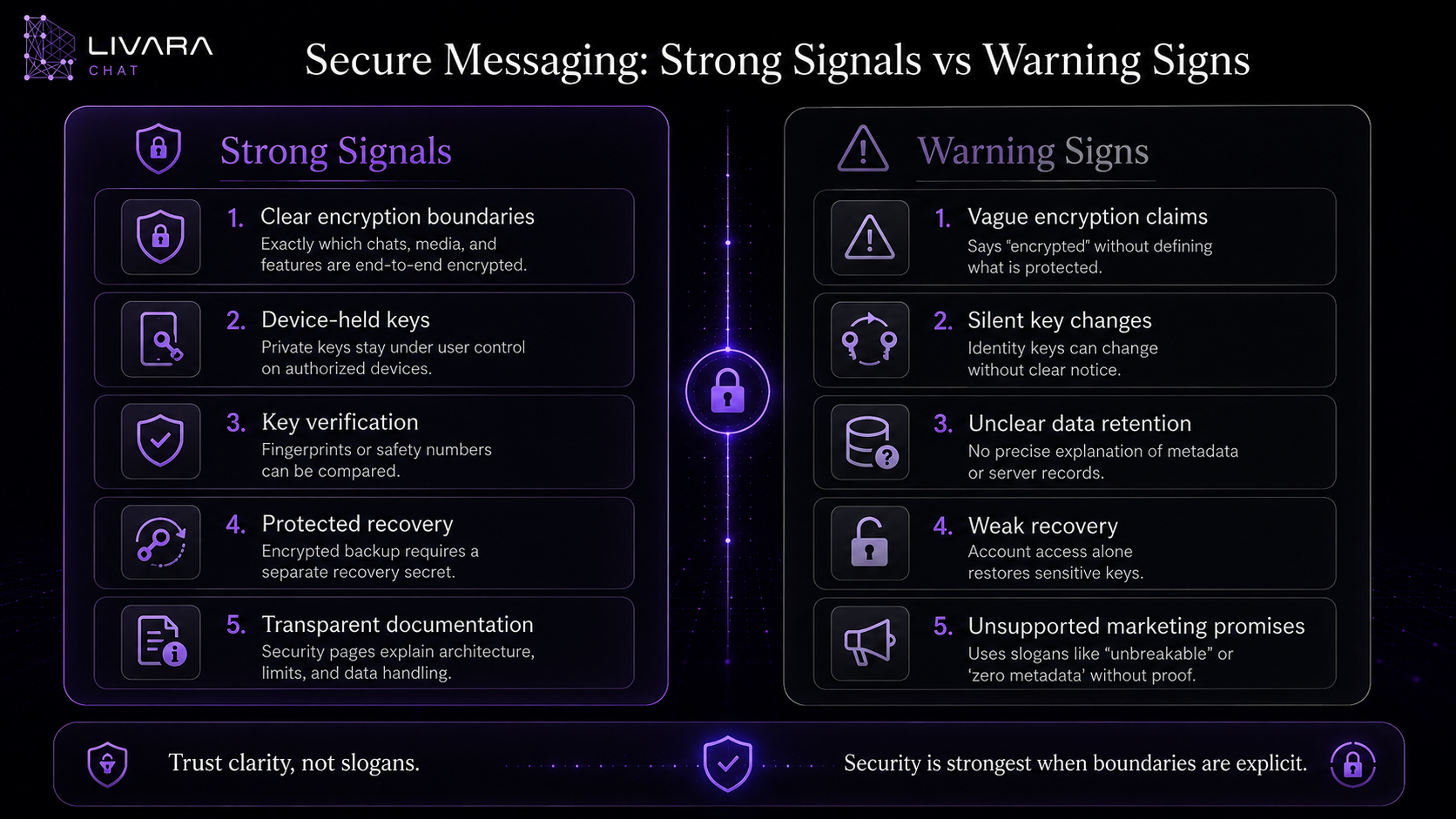
Secure messaging: strong signals and warning signs
| Strong signal | Warning sign |
|---|---|
| The provider names which conversations are E2EE | Every feature is described simply as “encrypted” |
| Private-key ownership is explained | Key handling is never discussed |
| Key changes are visible | Keys can change silently |
| Recovery limitations are documented | Support can restore everything without explaining how |
| Metadata categories are listed | The provider claims “zero metadata” without definitions |
| Media protection is described separately | Only text messages are mentioned |
| Groups have a defined trust boundary | Direct-chat claims are implied to cover groups |
| Security pages include current implementation details | Marketing language contradicts technical documentation |
| Limitations are stated clearly | The service claims absolute or unbreakable protection |
Insert the “Secure Messaging: Strong Signals vs Warning Signs” middle image here.
How Livara approaches secure messaging
Livara documents different protection boundaries for different conversation types.
Direct one-to-one conversations
Livara applies client-side encryption to direct message bodies and direct-chat media.
Its documented direct-chat design currently uses:
- P-256 ECDH for key agreement
- HKDF-SHA-256 for context-separated key derivation
- AES-256-GCM for authenticated encryption
- HMAC-SHA-256 as an additional integrity check
- Device-held private keys
- Comparable public-key fingerprints
- Client-side encryption for direct media
- An encrypted private-key backup protected by a recovery phrase
The server stores the ciphertext and the operational information required to deliver and synchronize the direct conversation.
Groups and channels
Livara does not currently describe group and channel content as end-to-end encrypted.
These conversations are protected in transit through HTTPS or secure WebSocket connections and governed through authenticated server-side membership and role checks.
That is a different boundary from direct-chat E2EE, and it is important to present it clearly.
Account and key recovery
Livara uses SRP authentication so the account password itself is not transmitted during authentication.
A user who enables encrypted key backup receives a recovery phrase. The private-key backup is encrypted on the client before upload, and signing in alone is not sufficient to restore it.
Losing both the private key and the recovery phrase may make existing encrypted direct-chat history inaccessible.
Realtime and offline synchronization
Livara uses a persistent Socket.IO connection for realtime message, typing, presence, call, and state events.
The client can stage text sends locally, retry them through stable operation identifiers, and reconcile them after receiving an authoritative acknowledgement.
A durable per-user change sequence helps a reconnecting client retrieve events missed during a disconnection.
You can review the current technical boundary on Livara Security, examine data handling on Livara Privacy, and read about synchronization on Livara Features.
A 60-second secure messaging checklist
Before creating an account, check whether you can answer each question:
- Which conversation types are end-to-end encrypted?
- Are images, videos, documents, and voice messages covered?
- Are private keys generated and retained on participant devices?
- Can contacts compare key fingerprints or safety numbers?
- Are key changes visible?
- Does the privacy policy identify stored metadata?
- Is account authentication explained?
- Is the key-recovery process separate from ordinary sign-in?
- Are private media requests authenticated and authorized?
- Does encryption remain active during offline queuing?
- Are groups and channels given a precise security boundary?
- Are limitations documented without exaggerated promises?
A provider does not need to use the same architecture as every competitor.
It does need to provide answers that are precise enough for users to understand what they are trusting.
The most secure choice depends on your threat model
There is no universal messaging app that is automatically best for every person and situation.
A family group, a workplace, a journalist and source, a healthcare team, and a public community may require different combinations of:
- Confidentiality
- Identity verification
- Anonymity
- Group administration
- Message retention
- Regulatory compliance
- Recovery
- Multiple-device support
- Open-source code
- Independent auditing
- Ease of use
Start by asking what you are protecting and from whom.
For ordinary personal communication, the primary risks might be account theft, an unsafe network, a lost device, or excessive data collection.
For higher-risk communication, you may also need verified identities, disappearing-message policies, hardened devices, strict operational procedures, and independent security review.
Encryption cannot repair a compromised endpoint or prevent a trusted recipient from sharing a message.
Privacy begins with accurate expectations
A trustworthy messenger does not ask users to believe that every risk has disappeared.
It explains:
- What is protected
- Which devices hold the keys
- What the server processes
- Which metadata remains
- How recovery works
- Where E2EE begins and ends
- Which protections have not yet been implemented
That clarity allows users to make informed decisions.
The safest messaging service is not necessarily the one making the loudest privacy promise. It is the one willing to define its architecture, acknowledge its limits, and keep its public claims synchronized with the product.
Read Livara Learn for plain-English security definitions, review the implementation on Security, or open Livara Chat in your browser.
Frequently asked questions
What makes a messaging app secure?
A secure messaging app combines protected network transport, strong authentication, careful access controls, secure key management, responsible data handling, and clearly documented privacy boundaries. For private message content, end-to-end encryption provides an important additional layer.
Is an encrypted messaging app automatically private?
No. An app can encrypt message content while still processing account information, timestamps, membership, receipts, device information, or other metadata. Privacy depends on both encryption and the service’s broader data practices.
Does end-to-end encryption hide who I message?
Not necessarily. E2EE primarily protects supported message content. The service may still require sender, recipient, membership, timing, and routing information to deliver and synchronize conversations.
Can a messaging provider recover E2EE messages?
That depends on the key and backup design. A provider may store encrypted message history but lack the private key needed to open it. A recovery system may restore the key only when the user supplies a separate recovery secret.
Is browser-based secure messaging safe?
A browser can perform strong client-side cryptography, but security still depends on the application implementation, browser integrity, device security, key storage, server delivery of application code, and the user’s extensions and operating system.
Are group chats always end-to-end encrypted?
No. Some services provide E2EE for groups, while others apply it only to direct conversations. Check the provider’s documentation for the exact boundary.
What happens if my encryption key changes?
A key change may result from a new device, reinstall, key reset, or recovery process. A secure messenger should make the change visible and allow contacts to verify the new fingerprint.
Is E2EE enough for highly sensitive communication?
E2EE protects content between supported endpoints, but it does not protect an infected or unlocked device, guarantee a recipient’s behavior, or automatically hide metadata. Higher-risk users also need strong device and operational security.